
After analyzing over 1.7+ million user sessions in Agent Mode, we identified the most prevalent categories of tasks users delegate to agents and measured the real cost of completing those tasks. Today, we’re introducing two complementary features to Agent Arena to help users gain a more nuanced understanding of how models stack up:
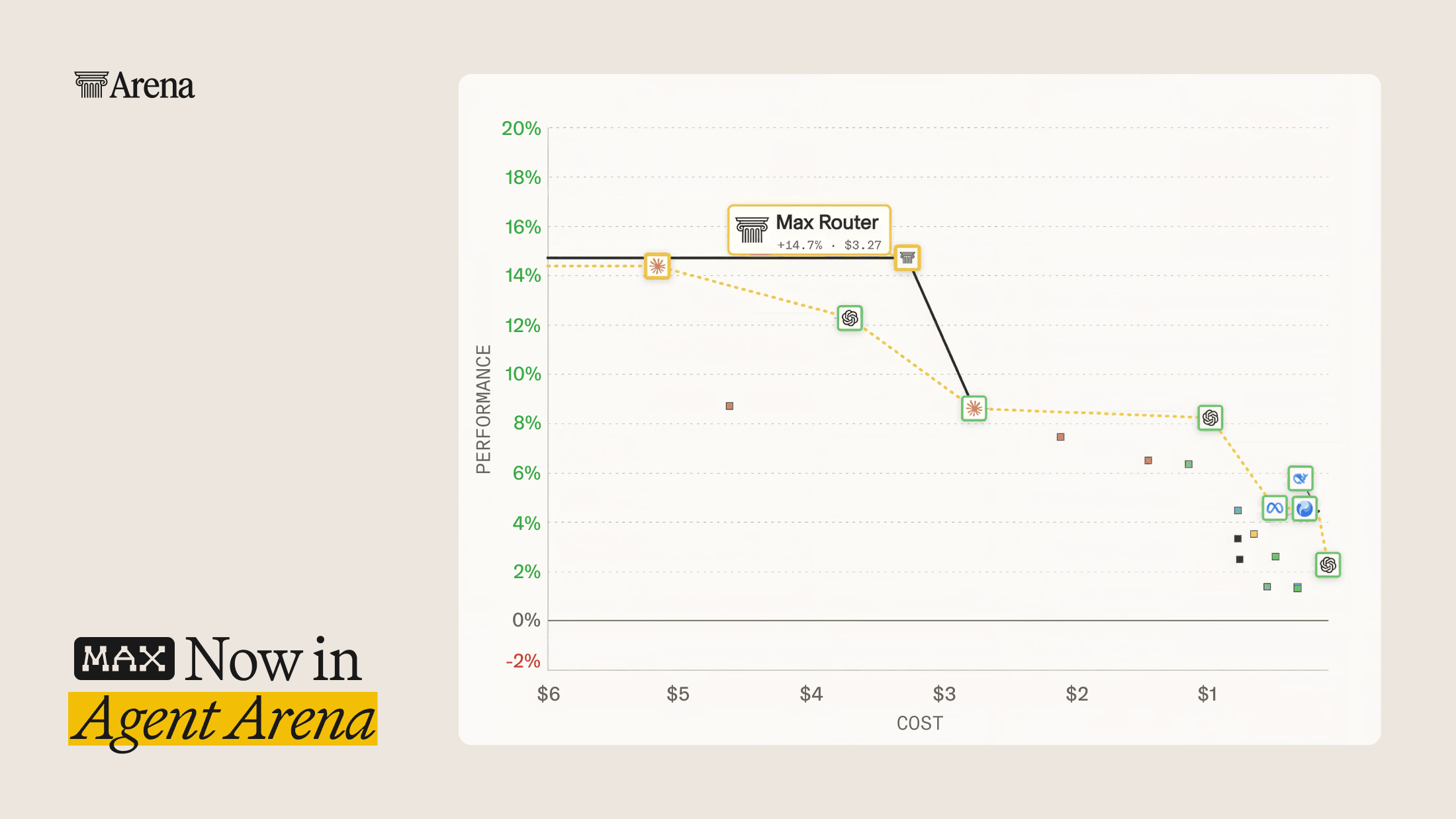
- Agent Costs: See what each model costs to complete a task, along with a Pareto Frontier view of the most cost-efficient models at every level of performance
- Agent Categories: Filter the leaderboard to understand how models rank in three categories: Code, Chat, and Work
Together, these transform the Agent Arena from a single ranking to a more personalized guide that helps you identify the right model at the right price point for your use case. Let’s take a deeper dive into each:
What a Task Costs
Representing costs in Agent Arena requires nuance because people use agents to do tasks. We opted for price per task as our primary measure for agent costs to represent how agents are used. We measure this using tasks completed by users in real Agent Mode sessions. With this update, we are also adding output tokens per task and cost per million tokens to the Agent leaderboard.
Task Boundaries
To measure cost fairly, we need a common unit of work that is comparable across models. We chose an individual task as the primary unit for costs. We segmented Agent Mode sessions into discrete task boundaries in order to compute the cost for each task.
For example: a single task may be a user asking an agent to rearrange a piece of sheet music for the violin. The task lasts four turns: the user goes back and forth with the agent on specifics before the agent produces a final arrangement, at which point the task is done and the user moves on to another task.
This task segmentation also allows us to measure the number of output tokens required per task, which helps measure the token-efficiency of a model, as models often differ in how many tokens they use to do a given task.
Measuring Task Cost
With a “task” boundary defined, we move to the actual cost calculation. A simple average of cost across all tasks in a session makes models that have been sampled in long-running sessions look expensive. This is because long-running sessions can skew costs higher through context carry-over. Longer sessions accumulate more context that is processed each turn, and as a result, later tasks in a session cost more regardless of the cost-efficiency of the model.
Users engage more with some models, resulting in them having longer sessions and higher context carry-over. We don’t want to inflate measured cost for strong models that are more retentive, and we don’t want our cost metric to reward weaker models that are less retentive.
To measure costs in a representative manner, we decided to track costs for, at most, the first three tasks in an Agent Arena session. This helps reduce the impact of carry-over costs, creating a fair comparison standard.
The Pareto Frontier
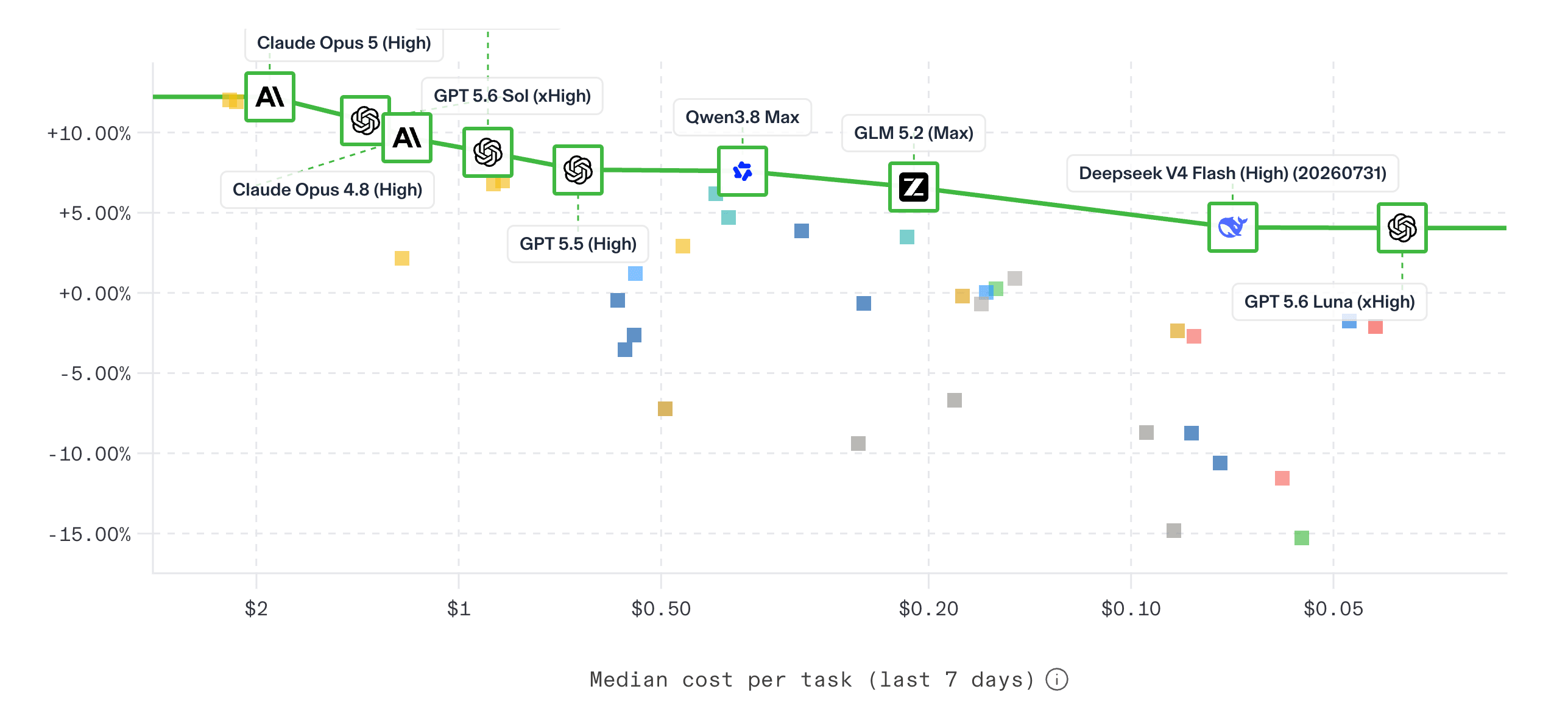
With both net improvement scores and costs, we have the components needed to visualize the price vs. performance tradeoffs for models. The new Agent Pareto view plots every Agent Arena model with net improvement score on the y-axis and cost per task on the x-axis. The frontier represents the boundary of the highest net improvement for each price point, highlighting models where you cannot get better performance without paying more.
You can view the cost vs. performance Pareto frontier, with the option to view the frontier by p25, p50, and p95 cost per task. To make these concrete with real Agent Arena examples: a short task may be a user asking for a single illustration that takes one turn and completes in a few seconds. A median task looks like standing up a simple front-end for a website, taking a handful of turns and lasting several minutes. A long task looks like creating a mobile app version of a web tool, including working through bugs and builds as a user works on it over several hours.
You can also view a Pareto frontier for models using their output token efficiency per task. These numbers are an in-situ measurement of models doing real work in Agent Arena, not a controlled static benchmark.
Categories in Agent Arena
Categories are the primary way we organize traces from Agent Arena. Each trace can be tagged with one or more categories, since real agentic tasks often have applications in multiple domains.
We defined our categories to:
- Be easy to understand
- Capture a broad share of user behavior in Agent Arena
- Have meaningful differences in task intent across categories
- Represent economically relevant segments of agentic tasks
- Be statistically robust, with enough samples to support reliable leaderboard performance
When you view a category leaderboard, you are seeing the same evaluation methodology as the main Agent Arena, filtered to a specific trace domain. This makes categories a powerful tool for comparing model performance at different kinds of agentic tasks.
We introduce three categories based on the traces we analyzed. These categories cover three core user intents in Agent Arena: Code, Chat, and Work.
- Code: Sessions where users asked the agent to write code, debug code, automate workflows, or analyze data.
- Chat: General agentic chat use cases, such as creative writing, learning, questions about personal life, everyday research, and media generation.
- Work: Sessions with tasks you’d typically see in an office work setting: document creation, professional research, planning, and professional writing.
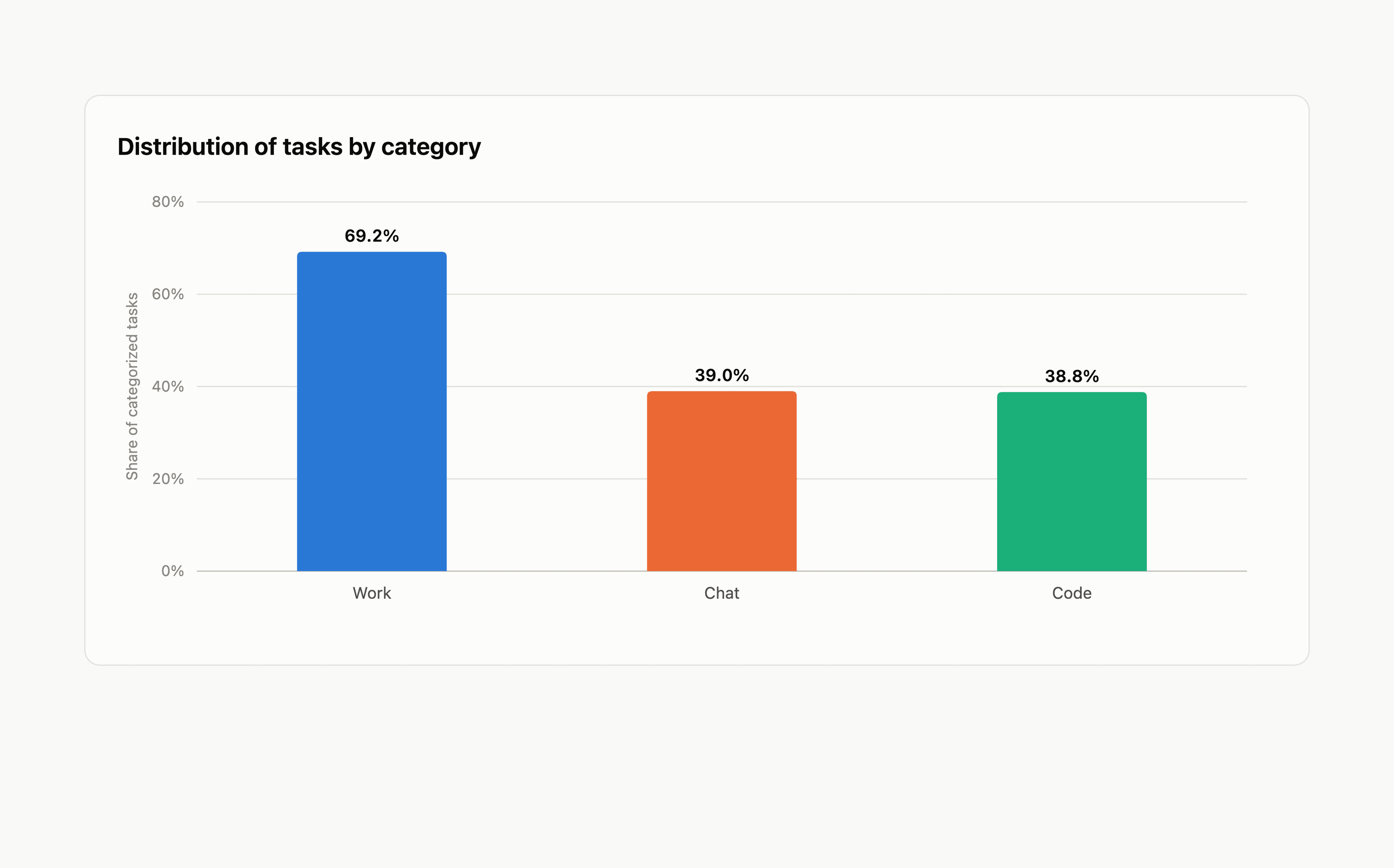
Across the 1.7M+ sessions, Work is the most common category, accounting for 69.1% of tasks. Chat and Code tasks make up roughly equal volume at 39.0% and 38.8%, respectively. These categories sum up to more than 100%, since tasks can belong to more than one category.
How Models Perform Across Categories
A single overall ranking can hide meaningful differences in what each model does best. The category leaderboards demonstrate how the top agentic models differ in their specific strengths.
We selected thirteen public models from seven providers and visualized their rankings by category. Interestingly, while Claude Opus 5 (High) ranks top overall and also leads Work, it is beaten to the top spot by GPT 5.6 Sol (xHigh) for Code and by Claude Opus 5 (Max) for Chat. The most stark result is for Claude Opus 4.7 (High): it ranks 8th overall but jumps all the way to 3rd for Chat, ahead of every newer model except the two Claude Opus 5 variants. The same pattern runs in reverse further down the leaderboard, where models that hold their own on Code, like DeepSeek V4 Flash and GPT 5.6 Luna, drop more than twenty places on Chat.
For a more comprehensive look at how these and other models compare across categories, we invite you to explore the full category leaderboard.
Examples of Prompts
To better illustrate what kinds of prompts fall into each category, check out the example prompts below.
Code:
Build a polished, playable browser game: open world realistic, no blocky characters, ray tracing. Make the core loop fun within the first ten seconds, with tight controls for both keyboard and touch, and juicy feedback — screen shake, particle effects, and satisfying animations. Include a start screen, a score system, pause and game-over states with instant restart, and a local high-score table. Style it with a cohesive visual theme and make sure it runs smoothly at 60fps on desktop and mobile.Chat:
Search the world for what's happening in the field of CFS/ME. Do a deep search of f news, studies and even social media. Find out if there are any new and promising approaches. Also find out about ways to enhance energy mental and physical.Work:
Create a report on thermal insulation performance testing system including case studies of HVAC, green houses, commercial energy plants along with their origins along with the working principles with classification of the TIPS with their cost and purpose.Explore Agent Arena
You can explore the category leaderboards, cost columns, and the Pareto view today on Agent Arena, and read about the methodology behind the Agent Arena rankings in our blog post. Help shape future evaluations by using Agent Mode and casting your votes.